A denied request is only the start of the troubleshooting process.
The default experience tells a user that access was blocked, but it usually does not answer the questions the support team immediately needs to ask:
- which identity was evaluated;
- which device was involved;
- whether Cloudflare One Client was connected;
- what posture checks passed or failed;
- which identity provider supplied the session;
- what public and virtual addresses were associated with the request;
- whether the same user has had recent failed attempts.
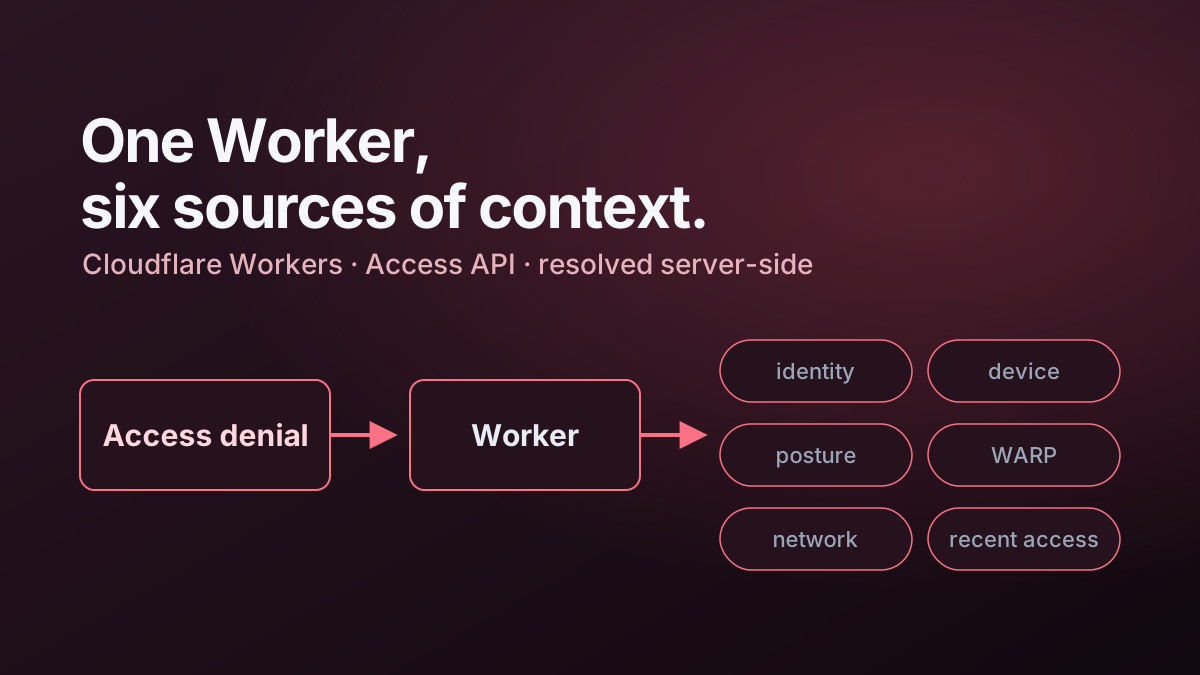
I built a Cloudflare Worker to turn that dead end into a useful diagnostic page.
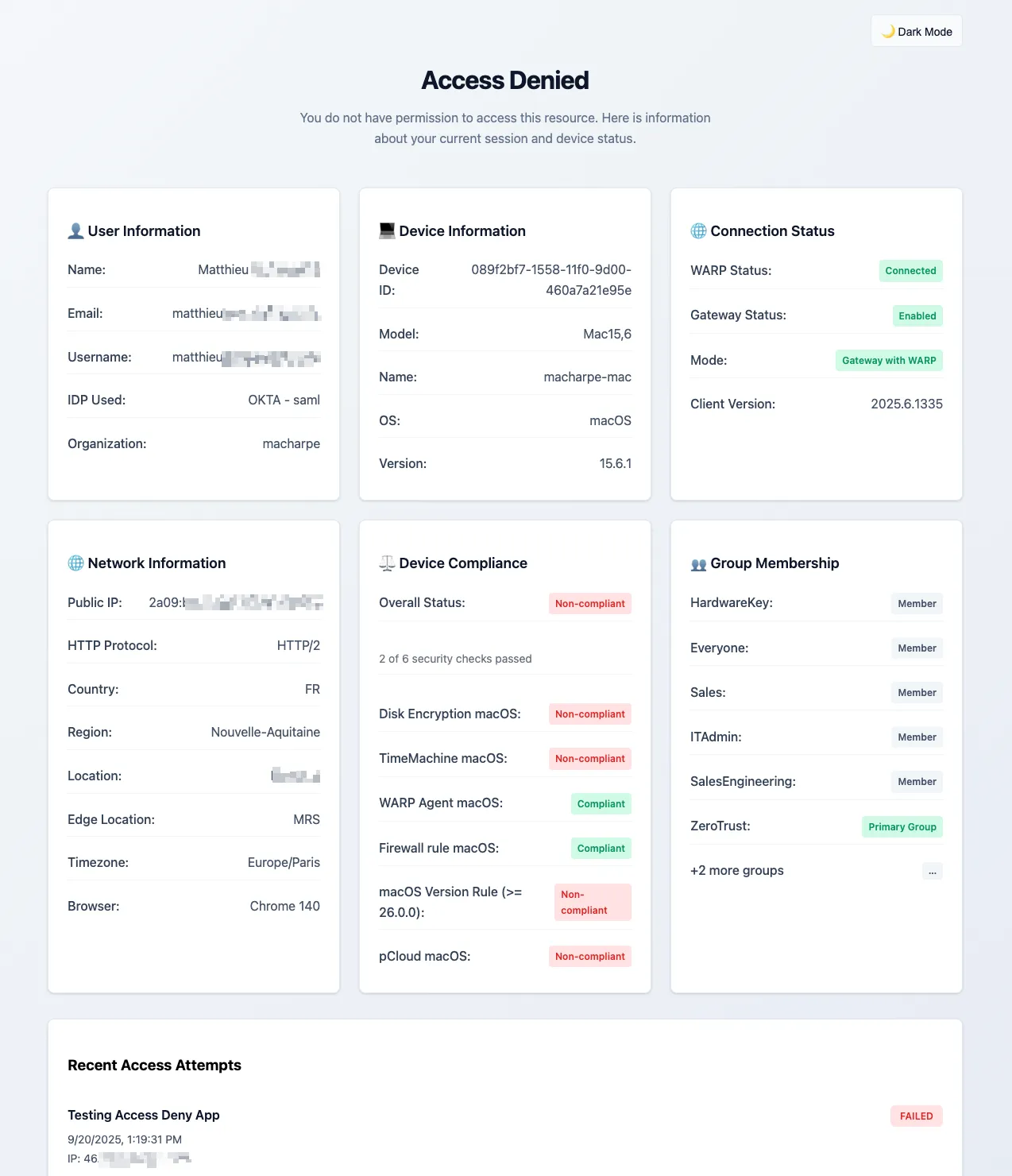
The aim was to make denial observable while keeping it just as strict.
The design goal
A useful denial page needs to balance two competing requirements.
First, it should give the user and support team enough context to understand what happened. Second, it must not become a convenient information-disclosure endpoint.
That led me to a simple principle:
Show information that helps explain the current access decision, but keep privileged administration data and credentials on the server side.
The Worker therefore acts as a broker. The browser talks to a small set of Worker endpoints, and the Worker talks to the Cloudflare APIs with a scoped API token.
User attempts protected app
        ↓
Cloudflare Access denies request
        ↓
Custom denial URL
        ↓
Cloudflare Worker
        ↓
Identity / device / posture / analytics APIs
        ↓
Diagnostic page
What I wanted the page to show
The implementation groups information into practical troubleshooting areas rather than exposing raw API responses.
The page includes:
- user identity and email;
- identity provider information;
- device name, model and operating system;
- Cloudflare One Client mode and version;
- WARP and Gateway status;
- Cloudflare One Client virtual IPv4 and IPv6 addresses where available;
- public IP and edge/network information;
- device posture results;
- group membership;
- recent failed access attempts.
That is enough to answer a large percentage of the questions I would otherwise need to ask manually.
Retrieve data server-side
The browser should not receive a Cloudflare API token.
Instead, the Worker exposes narrow endpoints such as:
/api/userdetails
/api/history
/api/networkinfo
/api/environment
/api/idpdetails
Each endpoint returns only the fields required by the UI.
Conceptually:
const response = await fetch(
  `https://api.cloudflare.com/client/v4/accounts/${accountId}/devices/${deviceId}`,
  {
    headers: {
      Authorization: `Bearer ${apiToken}`
    }
  }
);
The token remains in Worker secrets and is never rendered into the HTML or JavaScript sent to the client.
Cloudflare One Client virtual addresses are useful evidence
One addition I found particularly useful was displaying the virtual IPv4 and IPv6 addresses assigned to the device registration.
The Worker can query active registrations for the device and extract the current virtual addresses. That gives support teams another identifier to correlate with Gateway logs, private-network routing and policy decisions.
The pattern is roughly:
Device ID from Access context
        ↓
Query active device registrations
        ↓
Select active/recent registration
        ↓
Return virtual IPv4 / IPv6
The important point is that the page does not guess whether a device is enrolled. It retrieves current registration information and only shows the addresses when they exist.
Posture information needs presentation, not dumping
Raw posture data can be noisy.
A support-friendly page should summarise the outcome first:
Overall: Non-compliant
Passed: 7
Failed: 1
and then let the user expand the individual checks.
That is much more useful than presenting a large JSON structure and asking someone to work out which property mattered.
The UI should also avoid implying that every failed check caused the Access denial. The posture result is evidence; the Access policy remains the authoritative decision point.
Recent access attempts add temporal context
A single denial can be misleading.
If the page can show a short history of recent failed attempts, the user can immediately see whether the issue is isolated to one application or appears across several protected resources.
That is especially useful when diagnosing:
- stale identity sessions;
- group membership changes;
- newly applied posture policies;
- device re-enrolment issues;
- changes to WARP mode or profile selection.
I keep this history intentionally narrow. A denial page is a support aid, not an analytics console.
Fail safely when enrichment is unavailable
The denial page depends on several APIs. Those APIs can be slow, unavailable or return incomplete information.
That must not turn the page itself into another failure.
My preferred behaviour is:
API succeeds       → show enriched value
API unavailable    → show a neutral fallback
API returns nothing → omit the optional field
For example, if a rule, device or identity-provider lookup fails, the page should still render and provide whatever information is available.
The original access decision has already been made. Enrichment should never weaken it.
Fetch independent data in parallel
A denial page is interactive support tooling, so latency matters.
Independent lookups should not be performed one after another when they can safely be fetched in parallel.
For example:
const [identity, history, network, idp] = await Promise.all([
  getIdentity(),
  getHistory(),
  getNetworkInfo(),
  getIdentityProvider()
]);
The same approach applies inside the Worker when device details, posture state and registration information are independent.
This makes the page feel immediate even though several control-plane lookups are happening behind it.
Treat the page as a security-sensitive application
A custom denial page is still an application exposed at the edge.
I therefore treat it like any other security-sensitive Worker:
- keep API credentials in secrets;
- use scoped API tokens;
- validate request parameters;
- restrict CORS where JSON endpoints are exposed;
- escape user-controlled values before rendering HTML;
- send restrictive security headers;
- do not cache personalised responses publicly;
- avoid logging sensitive tokens or complete identity payloads.
The diagnostic experience should improve operability without creating a new attack surface.
Configure Access to use the Worker
Once the Worker is deployed, Access applications can be configured to redirect denied requests to the custom page.
I prefer to do this consistently across applications so users do not receive a rich troubleshooting page for one protected application and a generic error for another.
Where the Access application is managed with Terraform, the custom denial URL should also be managed as code so it remains part of the application definition rather than a manual dashboard exception.
What this changed operationally
The biggest improvement was not visual.
It changed the first support conversation from:
“I cannot get into the application.”
into something much closer to:
“The correct identity is being used, WARP is connected, but the device is failing one posture check.”
That is a materially better starting point.
It also reinforces a broader Zero Trust engineering principle: a control should be observable when it denies access.
Blocking is easy. Explaining a block safely and accurately is the more interesting engineering problem.
Related implementation
The working implementation is documented in Cloudflare Access Denied Information Page.
For the Gateway equivalent, see Building a Better Cloudflare Gateway Block Page.