A successful backup job is not the same thing as a recoverable system.
It tells us that a command ran and produced something the backup product accepted. It does not prove that:
- the intended data was included;
- the destination was correct;
- retention behaved safely;
- the resulting backup can be read;
- an operator can restore it within the required time.
Good backup automation therefore needs two distinct concerns:
- configuration convergence - make the backup policy match the desired state;
- recovery assurance - prove that usable recovery points exist and can be restored.
Idempotence belongs mainly to the first concern.
Model the desired backup state
I prefer to describe the required configuration as data rather than embedding it in procedural code.
$desiredProfile = [pscustomobject]@{
    Name             = 'server-baseline'
    Sources          = @('C:\Data', 'D:\Applications')
    Destination      = 'E:\Backup'
    Schedule         = @('02:00')
    RetentionDays    = 30
    IncludeSystemState = $true
    EncryptionRequired = $true
}
The example is deliberately provider-neutral. The same pattern can sit in front of Windows Server Backup, a file backup tool, a storage snapshot API or a cloud backup service.
The automation should translate this desired model into the provider’s configuration rather than forcing the source file to contain every vendor-specific field.
Idempotence is about convergence
A backup payload is expected to change between runs. The configuration should not.
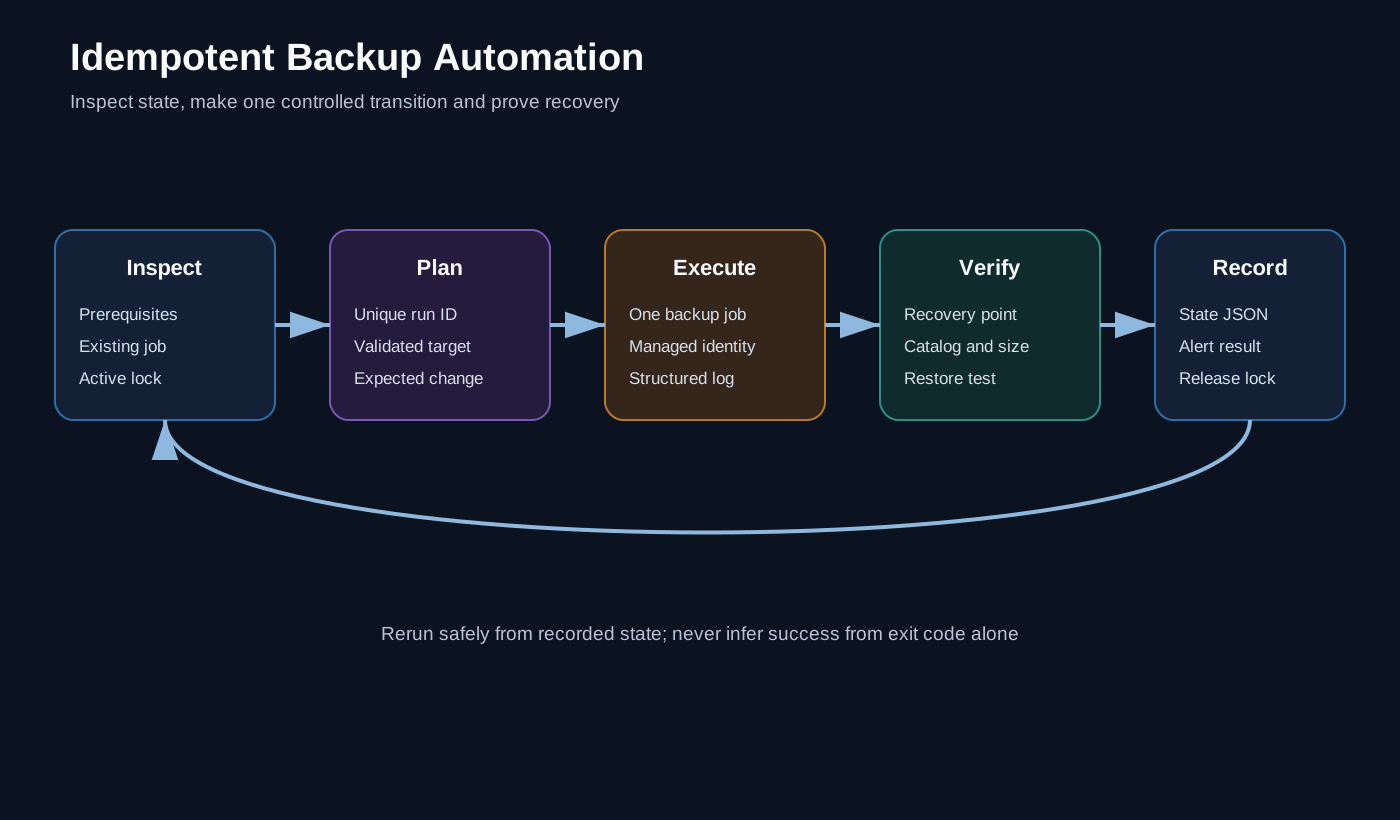
A convergent process looks like this:
Desired profile
      ↓
Read current provider state
      ↓
Normalise both representations
      ↓
Calculate a change plan
      ↓
Preview or apply
      ↓
Read back and verify
If the current state already matches the desired state, the result should be a clean no-op.
Normalise before comparing
Provider APIs and command-line tools often return values in a different order or representation from the input.
Before comparing, normalise values such as:
- path separators and trailing slashes;
- source ordering;
- schedule formats;
- case-insensitive identifiers;
- provider defaults;
- null and empty collections.
For example:
function Normalize-BackupProfile {
    [CmdletBinding()]
    param(
        [Parameter(Mandatory, ValueFromPipeline)]
        [psobject]$Profile
    )

    process {
        [pscustomobject]@{
            Name = $Profile.Name.Trim().ToLowerInvariant()
            Sources = @(
                $Profile.Sources |
                    ForEach-Object { $_.TrimEnd([char]'\') } |
                    Sort-Object -Unique
            )
            Destination = $Profile.Destination.TrimEnd([char]'\')
            Schedule = @($Profile.Schedule | Sort-Object -Unique)
            RetentionDays = [int]$Profile.RetentionDays
            IncludeSystemState = [bool]$Profile.IncludeSystemState
            EncryptionRequired = [bool]$Profile.EncryptionRequired
        }
    }
}
Without normalisation, harmless differences create repeated updates and noisy deployment reports.
Produce a change plan first
The comparison function should return objects that describe the intended change.
[pscustomobject]@{
    Property = 'RetentionDays'
    Current  = 14
    Desired  = 30
    Action   = 'Update'
}
That plan can drive both preview and deployment.
$comparisonParameters = @{
    Current = $currentProfile
    Desired = $desiredProfile
}

$plan = Compare-BackupProfile @comparisonParameters
$plan | Format-Table Property, Current, Desired, Action

if ($Deploy -and $plan) {
    Set-BackupProfile -Plan $plan -WhatIf:$WhatIfPreference
}
Using one plan for both modes avoids the dangerous situation where the preview code and deployment code make different decisions.
This is the same maintainability principle described in Engineering Standards for Maintainable PowerShell Automation.
Prevent overlapping runs
Backup automation should not start a second configuration or retention operation while the first is active.
On Windows, a named mutex is one simple guard:
$mutex = [System.Threading.Mutex]::new(
    $false,
    'Global\BackupAutomation-server-baseline'
)

if (-not $mutex.WaitOne(0)) {
    $mutex.Dispose()
    throw 'Another backup automation run is already active.'
}

try {
    # Read, compare, apply and verify.
}
finally {
    $mutex.ReleaseMutex()
    $mutex.Dispose()
}
A distributed platform may need a lease in a database, storage account or orchestration service instead. The principle is the same: only one writer should control a profile at a time.
Treat deletion and retention as high-risk operations
Creating an additional recovery point is usually low risk. Removing recovery points is not.
I put explicit controls around retention:
- calculate candidate deletions before changing anything;
- retain a minimum number of known-good recovery points;
- fail when the deletion count exceeds a threshold;
- exclude the newest successful recovery point;
- require a separate switch or approval for destructive maintenance;
- record exactly which recovery points were removed.
A retention function should never interpret an empty discovery result as permission to delete everything it can see.
Verify the result independently
After configuration or execution, query the provider again.
For a Windows Server Backup implementation, commands such as wbadmin get status and wbadmin get versions can provide provider evidence. Other tools expose catalog or job APIs.
The verification object should capture at least:
Profile name
Start and finish time
Provider job identifier
Result
Bytes or items protected
Recovery-point identifier
Destination
Verification result
Do not rely only on the exit code from the command that started the job.
Separate retryable and terminal failures
A temporary network timeout may justify a bounded retry. Invalid credentials, an inaccessible destination or a malformed policy normally should not.
A useful retry policy has:
- a small maximum attempt count;
- exponential or stepped delay;
- a clear list of retryable conditions;
- no retry around destructive operations unless the provider is idempotent;
- one final terminating error containing the full context.
Unlimited retry loops hide outages and can collide with the next scheduled run.
Do not log secrets
Backup systems often need credentials, encryption material or storage tokens.
Keep them out of:
- source files;
- command-line arguments where possible;
- transcript output;
- pipeline variables printed for diagnostics;
- result objects;
- exception messages.
Prefer workload identity, managed identity or a platform credential store. Where a secret is unavoidable, scope and rotate it independently for each backup consumer.
Restore testing is the real acceptance test
The automation is incomplete until recovery is tested.
A practical restore test can:
- select a recent recovery point;
- restore a representative data set to an isolated path or host;
- validate expected files, hashes or application checks;
- measure recovery time;
- remove the isolated test data;
- publish evidence and alert on failure.
For system-state or full-system recovery, schedule controlled exercises rather than pretending a file-level test proves the complete recovery path.
Restore automation should use a different permission boundary from backup creation. The account that writes backups does not automatically need unrestricted restore rights.
The operating model I want
Versioned desired configuration
          ↓
Read-only discovery
          ↓
Deterministic change plan
          ↓
What-If and approval
          ↓
Idempotent configuration
          ↓
Backup execution
          ↓
Independent verification
          ↓
Scheduled restore test
          ↓
Evidence and alerting
Automating a command is the easy part. The objective is to make backup behaviour predictable and recovery evidence routine.
Further reading
Paths, profile names and schedules are synthetic. The article describes a general design pattern and does not reproduce any production backup configuration, credentials or retention policy.