PKI incidents are often caused by something entirely predictable:
- a certificate expires;
- a certificate revocation list is not published;
- a trust path changes;
- a certificate template is altered without understanding its consumers;
- a certification authority backup is incomplete;
- a renewal succeeds technically but the dependent service still uses the old certificate.
These are good candidates for automation, but PKI is also an area where an overconfident script can create a wider outage very quickly.
The goal should not be to automate every click. It should be to automate evidence, repeatable checks and low-risk actions while keeping high-impact changes controlled.
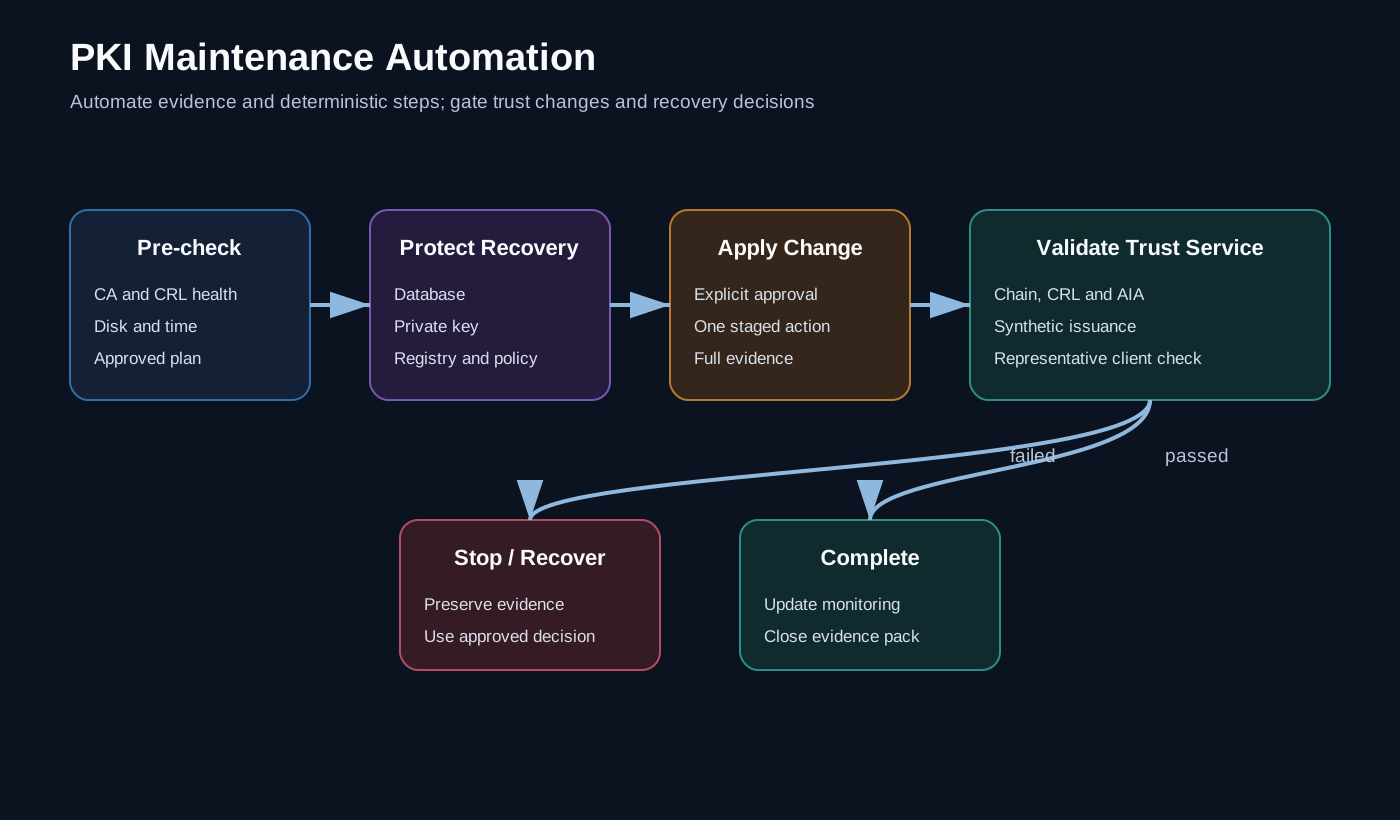
Split the runbook into five stages
A dependable maintenance workflow has a simple shape:
Inventory
   ↓
Health assessment
   ↓
Change plan
   ↓
Controlled maintenance
   ↓
Independent validation and evidence
The stages should remain separate. A discovery failure must not be interpreted as permission to renew, revoke, remove or reconfigure anything.
Build an authoritative inventory
Before automating maintenance, identify the objects that matter.
For an enterprise Microsoft PKI, that normally includes:
- root and issuing certification authorities;
- CA certificates and expiry dates;
- certificate database and private-key backup status;
- CRL and Authority Information Access locations;
- base and delta CRL validity;
- Online Responder services, where used;
- published certificate templates;
- template owners and consumers;
- certificates used by critical services;
- renewal method and support owner;
- hardware security module dependencies, where present.
A spreadsheet can start the process, but the long-term source should be machine-readable and versioned.
certificateServices:
  - service: example-api
    owner: platform-engineering
    endpoint: api.example.test
    renewalMethod: automated-enrolment
    warningDays: 45
    validation:
      - tls-chain
      - application-health
The inventory should describe ownership and validation, not contain private keys, passwords or certificate exports.
Automate expiry discovery first
Expiry reporting is a low-risk entry point because it can be read-only.
$warningDate = (Get-Date).AddDays(45)

Get-ChildItem -Path Cert:\LocalMachine\My |
    Where-Object { $_.NotAfter -le $warningDate } |
    Sort-Object NotAfter |
    Select-Object @{
        Name = 'Subject'
        Expression = { $_.Subject }
    }, Thumbprint, NotBefore, NotAfter, HasPrivateKey
A production implementation should add:
- the computer and store name;
- enhanced key usage;
- issuer and chain status;
- the consuming service;
- duplicate or superseded certificates;
- whether the private key is accessible to the expected service account.
Do not assume every certificate in LocalMachine\My is in use. Inventory the binding or application dependency separately.
Monitor publication and trust, not just expiry
A CA certificate can be valid while clients still fail because revocation or chain information is unavailable.
Health checks should cover:
- CRL and delta CRL freshness;
- HTTP or LDAP publication locations;
- AIA availability;
- chain building from representative clients;
- CA and Online Responder service state;
- database and disk capacity;
- recent failed or pending requests;
- time synchronisation;
- event-log errors.
Microsoft’s Enterprise PKI tooling can validate CA certificates and revocation data across the forest. For targeted testing, certutil can inspect a certificate and retrieve chain and revocation information:
certutil -verify -urlfetch .\synthetic-test.cerTreat the output as diagnostic evidence rather than a stable application programming interface. Parse only what you can test across the supported server versions and languages in your estate.
Make the maintenance plan explicit
The automation should produce a plan object before making a change.
[pscustomobject]@{
    Resource       = 'Issuing CA certificate'
    CurrentExpiry  = [datetime]'2026-11-30'
    ProposedAction = 'Renew'
    ChangeWindow   = 'CHG-000123'
    Validation     = @(
        'Issue synthetic certificate',
        'Build chain from client',
        'Verify CRL retrieval'
    )
    Risk           = 'High'
}
A plan should identify:
- exactly what will change;
- why it is required;
- dependencies;
- expected interruption;
- backup prerequisites;
- validation steps;
- rollback or recovery procedure;
- approval state.
This is where automation supports change control instead of bypassing it.
Treat CA backup as a complete recovery set
A certification authority backup is more than one folder.
For a Microsoft enterprise CA, recovery planning should account for:
- the CA database and logs;
- the CA certificate and private key;
- CA registry configuration;
CAPolicy.inf, where used;- the list of certificate templates published by the CA;
- HSM configuration and recovery procedures;
- backup passwords and custody;
- a tested restore procedure.
The CA private-key backup is extremely sensitive. Store it separately from normal operational logs and apply strong access control, encryption and dual-control procedures appropriate to the environment.
The automation can verify that expected backup artefacts exist, are recent and have been copied to the approved protected location. It should not print key material, backup passwords or PFX metadata into a pipeline log.
Automate low-risk actions before high-risk actions
A sensible progression is:
Good early candidates
- certificate inventory;
- expiry alerts;
- CRL freshness checks;
- service and event-log checks;
- backup-age verification;
- test-certificate issuance;
- chain and endpoint validation;
- reporting and evidence collection.
Changes that need stronger controls
- publishing a new CRL outside the normal schedule;
- modifying templates;
- renewing a CA certificate;
- changing cryptographic providers or key algorithms;
- changing AIA or CRL distribution points;
- revoking certificates in bulk;
- removing old CA certificates;
- restoring a CA database or private key.
Automation can execute high-risk work, but only after the plan, backup, approval and validation gates are explicit.
Verify from the consumer’s perspective
A maintenance task is not complete because the CA console looks healthy.
Validation should include a representative consumer path:
- request a synthetic certificate from an approved test template;
- confirm the expected subject, extensions and validity;
- build the chain from a representative client;
- retrieve CRL or OCSP information;
- bind the certificate to a test service where appropriate;
- complete a real authentication or TLS handshake;
- confirm monitoring sees the new state;
- remove the synthetic test artefacts.
For a service-certificate renewal, test the service endpoint and process binding. A new certificate sitting in the store proves very little if the service is still presenting the previous one.
Create evidence that an operator can trust
The result object should be concise and structured:
Check name
Target
Previous state
Current state
Result
Evidence location
Change reference
Timestamp in UTC
Automation version
Warnings must remain visible. Avoid a single green status that hides several skipped checks.
I also distinguish between:
- healthy - the check passed;
- warning - valid now but inside a threshold;
- failed - required behaviour is broken;
- unknown - evidence could not be collected.
Unknown is not healthy.
Build renewal into normal operations
Certificate renewal becomes risky when it is treated as an exceptional event every few years.
A mature operating model has:
- continuous inventory;
- alert thresholds based on the actual renewal lead time;
- named service and technical owners;
- a rehearsed rollover process;
- overlapping certificates where the application supports them;
- automated post-renewal validation;
- evidence that old bindings and certificates were retired safely.
This is also why SAML integrations need certificate lifecycle ownership. The certificate may be only one field in the initial setup, but it becomes the critical dependency during rollover.
The wider lesson
PKI maintenance automation should make risk more visible, not hide it behind a scheduled task.
The most valuable automation is usually the automation that tells us:
- what exists;
- what is approaching failure;
- what a proposed change will affect;
- whether recovery prerequisites are complete;
- whether consumers work after the change.
That turns a runbook from a list of remembered steps into a repeatable engineering control.
Further reading
- Active Directory Certificate Services documentation
- Migrate a Certification Authority in Windows Server
- Certutil command reference
All names, dates, paths and change references are synthetic. The article deliberately excludes CA names, template names, trust locations, private keys and recovery credentials.