SAML integrations are often described as a short exchange of URLs and a certificate.
That is technically true and operationally incomplete.
Most difficult SAML problems come from mismatched assumptions about identity, claims, assignment, certificate rollover or which side initiates the sign-in flow.
A reliable implementation starts by agreeing the contract before entering values in either portal.
Understand the flow
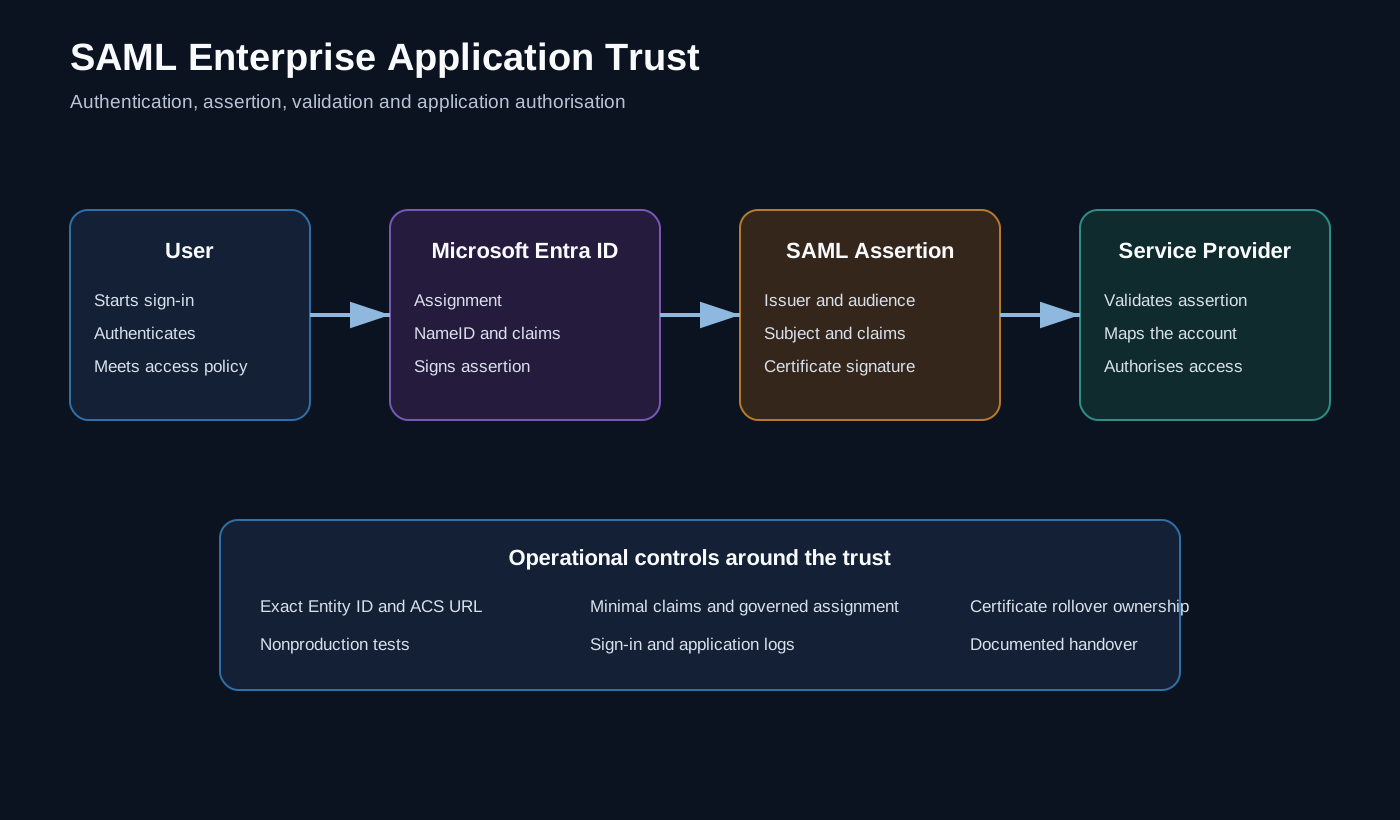
In a typical service-provider initiated flow:
User opens the application
          ↓
Application sends an authentication request
          ↓
Microsoft Entra ID authenticates the user
          ↓
Entra ID returns a signed SAML response
          ↓
Application validates the response and creates a session
The application is the service provider. Microsoft Entra ID is the identity provider.
The two systems must agree on identifiers, endpoints, signing behaviour and user attributes.
Collect the service-provider requirements first
Before creating the enterprise application, obtain a small integration specification from the application owner or vendor.
At minimum, I want:
| Requirement | Typical meaning |
|---|---|
| Identifier / Entity ID | The unique identifier for the service provider |
| Reply URL / ACS URL | Where Entra ID sends the SAML response |
| Sign-on URL | The application entry point, where required |
| Logout URL | The endpoint used for single logout, if supported |
| NameID format | The identifier expected for the user |
| Required claims | Attributes or roles consumed by the application |
| Signing requirement | Response, assertion or both |
| Metadata support | Whether the application can import federation metadata |
| Supported flow | SP initiated, IdP initiated or both |
| Test account behaviour | How users are created or matched in the application |
Do not infer these values from the application’s marketing URL. A Reply URL is frequently a specific path and matching may be exact.
Create the correct Entra object
Use a gallery application when Microsoft publishes a supported integration for the product. Gallery applications often provide validated defaults and product-specific guidance.
For a custom integration, create an enterprise application and choose the option to integrate an application not found in the gallery.
This is an enterprise application configuration. It is not the same task as creating an application registration for an OAuth client.
Assign named owners as part of creation. An application without a technical and service owner becomes difficult to govern when certificates, claims or vendors change.
Control assignment before broad testing
I normally require user assignment and start with a small test group.
That gives the deployment an explicit access boundary:
Integration administrators
Pilot users
Production groups
Avoid assigning the whole organisation merely to make the first test easier.
The test group should include:
- a normal user;
- a user with the expected group or role claim;
- a user who should be denied;
- an account with edge-case attribute values, where relevant.
Configure the basic SAML values
In the enterprise application’s Single sign-on configuration, the core fields are normally:
- Identifier (Entity ID);
- Reply URL (Assertion Consumer Service URL);
- Sign on URL, when required;
- Relay State, when the application needs it;
- Logout URL, when supported.
Use the vendor’s exact values. Pay attention to:
httpversushttps;- trailing slashes;
- case sensitivity in paths;
- regional or environment-specific hostnames;
- separate development and production instances.
Do not reuse one enterprise application for multiple service-provider instances unless the product and identifier design explicitly support it.
Design the identifier and claims deliberately
The NameID is how the application associates the SAML assertion with its local user.
Email address and user principal name are common choices, but they can change. Some applications support a stable employee or object identifier instead. The correct answer depends on how the service provider stores and reconciles users.
For every claim, document:
Claim name
Entra source attribute or transformation
Required or optional
Expected format
Application behaviour if missing
Owner of the mapping
Keep the assertion minimal. Do not send broad directory data because it might be useful later.
Group claims deserve particular care. Large group memberships can make assertions too large or cause the identity provider to emit an overage indication rather than the complete list. Prefer application roles or groups scoped specifically to the application where the service provider supports them.
Exchange metadata and signing material
Microsoft Entra ID exposes the identity-provider values and SAML signing certificate required by the service provider.
The application may accept:
- federation metadata XML;
- a metadata URL;
- a signing certificate and manually entered endpoints.
Record which method was used and where the application stores the trust configuration.
Treat the SAML signing certificate as an operational dependency with an expiry date. The implementation is not finished until certificate rollover has an owner, a lead time and a tested procedure.
Where the service provider supports overlapping certificates, use that capability to avoid a hard cutover. Where it accepts only one certificate, plan a coordinated maintenance window and a rollback route.
Configure the service provider
On the application side, enter or import the Entra identity-provider configuration.
Typical values include:
Login URL
Microsoft Entra Identifier
Logout URL
Signing certificate
Expected issuer
NameID mapping
Required claim mappings
The names differ by product, but the trust relationship is the same.
Do not enable automatic user creation until the attribute mapping and lifecycle consequences are understood. SSO and provisioning are related but separate controls.
Test the complete path
A useful test sequence is:
- verify the pilot user is assigned;
- test SP-initiated sign-in from the application’s normal URL;
- test IdP-initiated sign-in only if it is a supported business flow;
- confirm the application resolves the correct local user;
- verify role or group behaviour;
- test an unassigned user;
- review Microsoft Entra sign-in logs;
- review the application’s authentication logs;
- test logout and session expiry;
- test from a clean browser session.
When inspecting a SAML assertion, use an approved diagnostic tool and handle the assertion as sensitive data. It may contain user identifiers, group information and application roles.
Common failure patterns
Identifier mismatch
The issuer or audience expected by the application does not exactly match the Entity ID in Entra ID.
Reply URL mismatch
The assertion is sent to a URL the service provider has not registered or the configured path differs by case, slash or environment.
User not assigned
Authentication succeeds at the tenant but access to the enterprise application is blocked because the user or group is not assigned.
NameID mismatch
The assertion is valid, but the application cannot match the value to a local account.
Missing or malformed claim
The application expects a role, email address or identifier with a particular name or format.
Signing certificate problem
The service provider trusts an old certificate, expects a different signing mode or cannot build the certificate chain.
A disciplined troubleshooting approach compares the actual assertion with the written contract instead of changing several fields at once.
Apply security and resilience controls
Once the integration works, complete the production controls:
- restrict assignment to approved groups;
- apply appropriate Conditional Access policies;
- keep at least two named owners;
- use least-privilege administration roles;
- document a non-federated recovery route where the application supports one;
- monitor sign-in failures;
- review assignments and claims periodically;
- schedule signing-certificate renewal;
- retain the previous known-good configuration for rollback.
This is also a resilience concern. The identity and SaaS failure modes described in Designing Zero Trust for Failure apply directly to SAML-based applications.
Record the integration as an operational object
Even when the final configuration is performed in portals, keep a versioned deployment record:
application: Example Service
serviceOwner: Business Systems
technicalOwner: Identity Engineering
entityId: https://sso.example.test/saml/metadata
replyUrls:
  - https://sso.example.test/saml/acs
nameId: userPrincipalName
assignmentRequired: true
pilotGroup: SSO-ExampleService-Pilot
certificateRenewalLeadDays: 60
That record holds no secrets. It is the agreed integration contract, and it makes future review much easier.
The wider lesson
SAML itself is mature. The operational difficulty comes from lifecycle management around it.
One successful sign-in proves very little. A good integration has:
- a clear identity contract;
- controlled assignment;
- minimal claims;
- tested failure behaviour;
- certificate lifecycle ownership;
- logging;
- rollback;
- documentation that survives a change of staff or supplier.
Further reading
All application names, groups and URLs are synthetic. The article describes a general integration pattern and does not expose tenant identifiers, production claims or service-provider configuration.