Static IP allowlists age badly in cloud environments.
AWS, Azure and other cloud providers publish machine-readable network ranges precisely because the underlying infrastructure changes over time. If a security policy depends on those ranges, copying them into a spreadsheet or security console creates an obvious lifecycle problem.
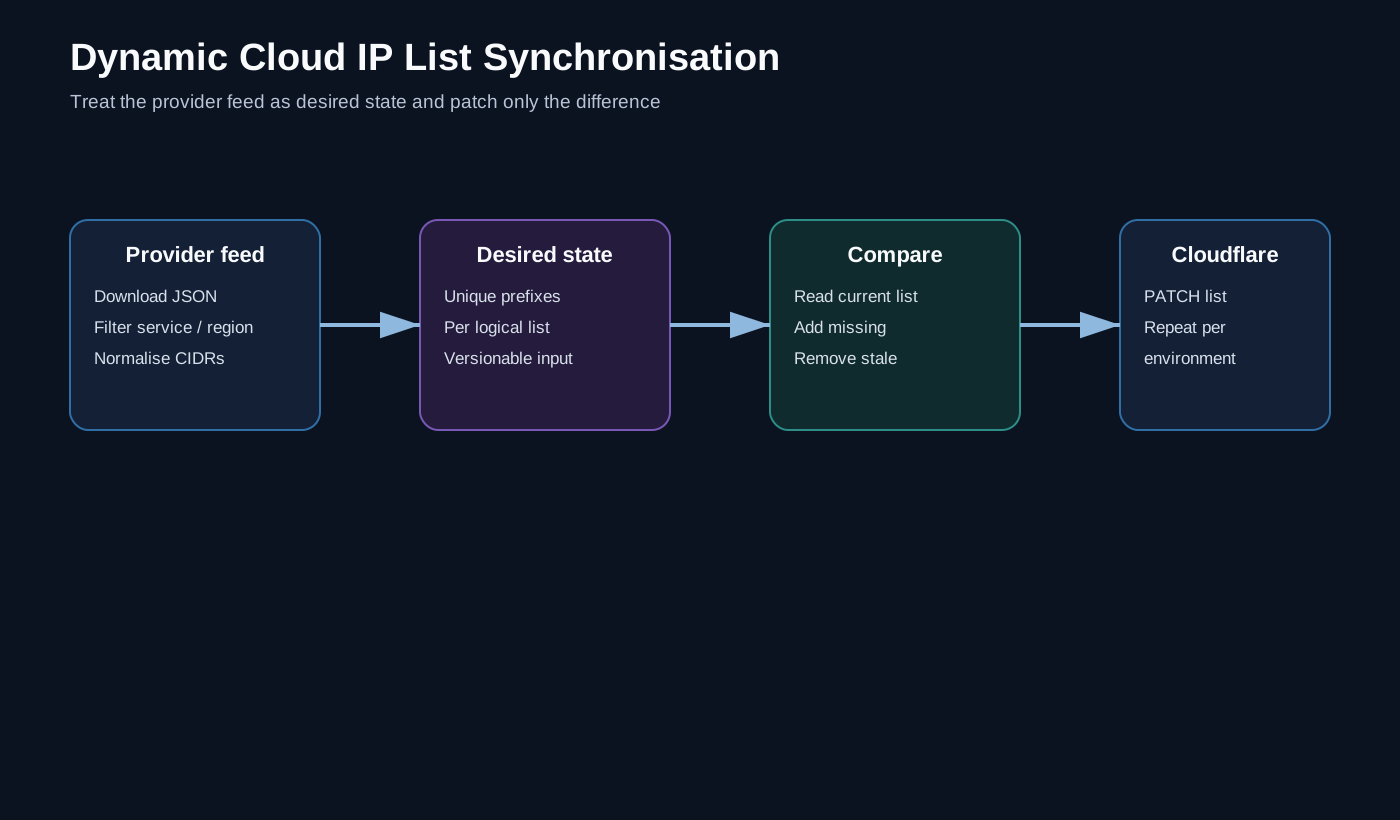
The pattern I prefer is to treat the provider feed as desired state and the Cloudflare list as deployed state.
The basic workflow
Provider JSON feed
      ↓
Filter / normalise
      ↓
Desired CIDR list
      ↓
Read Cloudflare list
      ↓
Compare
      ↓
Append missing / remove stale
For AWS, for example, the published ip-ranges.json feed contains prefixes annotated with service and region information. That makes it possible to create logical groups such as regional EC2/AMAZON ranges rather than treating every AWS prefix as equivalent.
Separate acquisition from policy
A useful design is a small configuration object describing how each list should be produced:
$Config = @(
    [pscustomobject]@{
        Name = 'AWS Europe'
        Uri  = 'https://example.invalid/provider-ranges.json'
        RegionPattern = 'eu-*'
        Services = @('AMAZON','EC2')
    }
)
Syntax aside, the important point is that the synchronisation engine does not contain a separate copy-and-paste block for every list.
The configuration says what to select; the engine performs the same acquisition, filtering, comparison and update process for each entry.
Compare desired and deployed state
A list synchroniser should not replace an entire object blindly if the API supports incremental change.
Conceptually:
$desired = $ProviderPrefixes | Sort-Object -Unique
$current = $CloudflareItems | Sort-Object -Unique

$diff = Compare-Object -ReferenceObject $desired -DifferenceObject $current

$toAdd    = $diff | Where-Object SideIndicator -eq '<='
$toRemove = $diff | Where-Object SideIndicator -eq '=>'
The resulting request contains only the delta.
That gives better logging and makes it much easier to notice an unexpectedly large change.
Put a brake on deletion
External feeds can fail in interesting ways.
A parsing bug, empty response or upstream schema change should not result in the automation deciding that every currently deployed prefix is obsolete.
Before removing entries I therefore like checks such as:
- provider response is non-empty;
- expected properties exist;
- resulting list is within a plausible size range;
- deletion count is below an operational threshold;
- unusual changes are surfaced for review.
The purpose is to distinguish a legitimate provider update from my automation misunderstanding its input, and change itself is expected.
Multiple environments should use one desired-state calculation
If the same logical lists exist in test, development and production, calculate the provider data once and then apply it consistently.
This avoids a subtle failure mode where each environment retrieves the feed at a different point and temporarily ends up with different list membership.
Generalising beyond AWS
The same engine can support several data sources if it understands a few concepts:
- where to obtain the data;
- which property contains candidate values;
- how to filter records;
- whether IPv4 and IPv6 are required;
- whether domains need resolving;
- which target list receives the result.
Once those pieces become configuration, the automation moves from AWS script to cloud-list synchronisation service.
Why this belongs in Zero Trust engineering
A policy is only as correct as the data it references.
If a Zero Trust rule relies on a list that is manually maintained, the manual process is part of the security control whether we acknowledge it or not.
Automating the list lifecycle gives us:
- fresher data;
- repeatability;
- visibility of additions and removals;
- consistent environments;
- fewer emergency edits in a dashboard.
That is a small example of a wider idea: automate the inputs to security policy, not just the policy itself.
All example names and values are synthetic. No production account IDs, credentials or internal network ranges are included.