Active Directory Sites and Services quietly influences a surprising amount of behaviour.
If a client IP does not belong to a subnet that AD can associate with a site, domain-controller selection and other site-aware services lose an important piece of topology information.
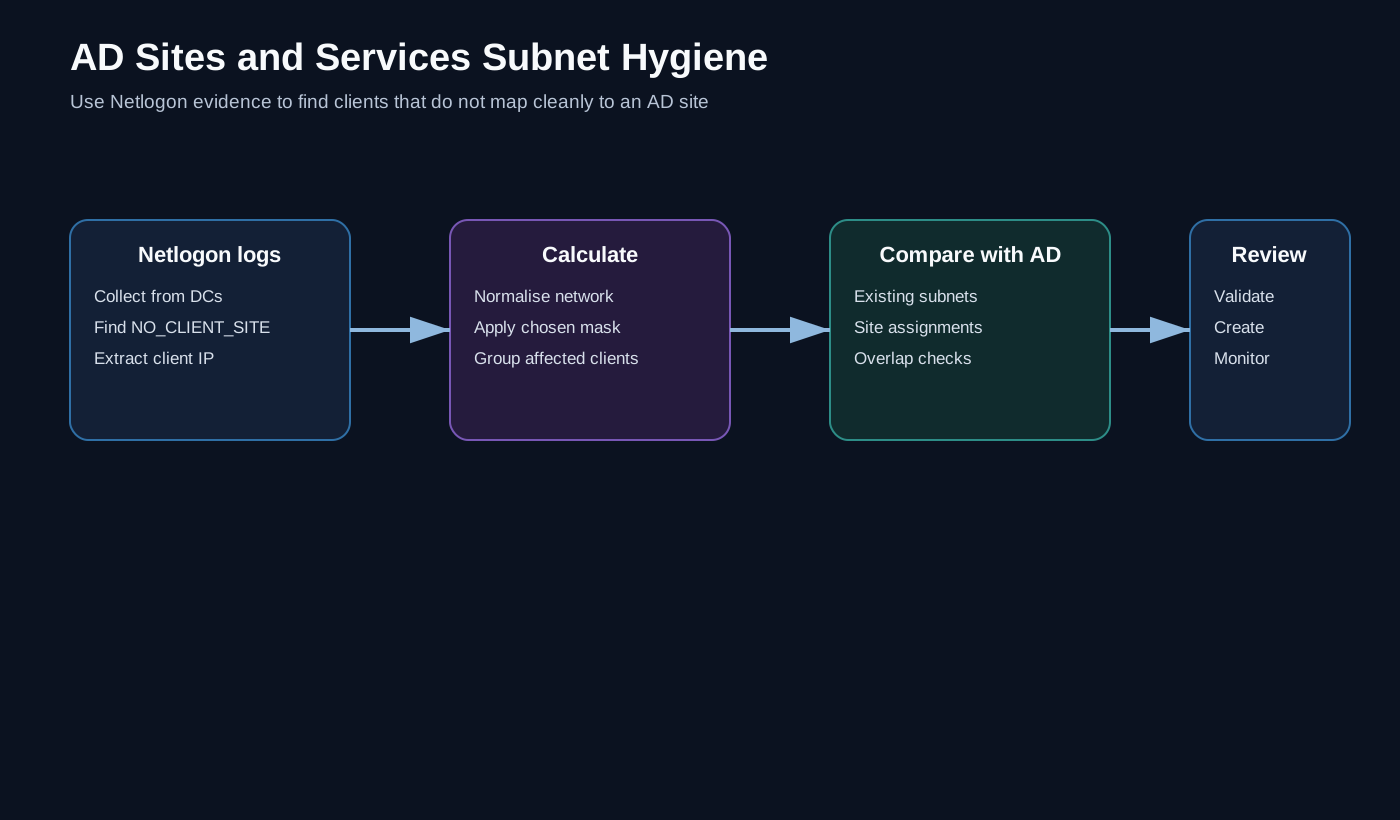
One useful clue is sitting in the domain controllers’ Netlogon logs: NO_CLIENT_SITE.
What NO_CLIENT_SITE tells us
Conceptually, the message says:
A client contacted me from this IP address, but I could not map that address to an Active Directory site.
One event may not matter.
Hundreds of events from the same network usually deserve investigation.
Instead of reading logs manually, PowerShell can turn those entries into structured evidence.
Collect from more than one DC
A forest with multiple domain controllers distributes authentication activity.
The collector therefore needs to support either:
- a selected list of DCs;
- all DCs in one domain;
- all DCs in the forest;
- previously collected log files for offline analysis.
Separating collection and analysis is useful because log access may be expensive or restricted.
Extract the useful fields
For each matching line, the important pieces are generally:
Client/computer
IP address
Source domain controller
A simple regular-expression stage can find NO_CLIENT_SITE entries and turn them into PowerShell objects.
The output can then be grouped by network rather than by individual host.
Convert an IP address into a candidate subnet
If the organisation normally defines client networks at /24, an address such as:
192.0.2.73would produce a candidate:
192.0.2.0/24The mask should not be guessed blindly. It is an input to the analysis.
Some environments use /23, /22 or much larger prefixes, and automatically creating a /24 from every event can create a different topology problem.
Compare candidates with AD before recommending anything
The workflow should retrieve the existing AD subnet objects and check whether the candidate range is already represented.
This catches several scenarios:
- genuinely missing subnet;
- an existing broader subnet;
- overlap with another site mapping;
- an address that should not be represented in AD at all.
The automation should produce a review list, not automatically create AD subnets from log entries.
Add affected computers to the report
A useful output looks like:
Candidate subnet     Seen clients     Existing mapping
192.0.2.0/24         37               none
198.51.100.0/24      2                broader /22 exists
203.0.113.0/24       91               none
Including affected clients helps prioritise the work. A subnet seen once from a temporary network is different from one consistently used by hundreds of managed endpoints.
Operational cautions
Before creating a subnet object, validate:
- network ownership;
- intended mask;
- site assignment;
- routing topology;
- overlap with existing definitions;
- whether the source addresses are NATed or transient.
The logs provide evidence, not authority.
Why I like this technique
This is a good example of using operational telemetry to maintain directory architecture.
AD topology is often documented when networks are first created and then forgotten. Netlogon provides a feedback loop: real clients tell you where the directory’s view of the network no longer matches reality.
PowerShell simply turns that feedback into something an engineer can review and act on.
This article describes the technique rather than republishing any archived script. All network ranges and machine names are documentation-only examples.