An Active Directory account lockout is rarely the real problem.
The lockout is the symptom. The actual problem is usually a credential being replayed somewhere:
- a scheduled task;
- a service;
- a disconnected session;
- a mapped resource;
- a mobile device;
- a script;
- an old application configuration.
PowerShell becomes useful when we stop looking at one event on one domain controller and build a timeline instead.
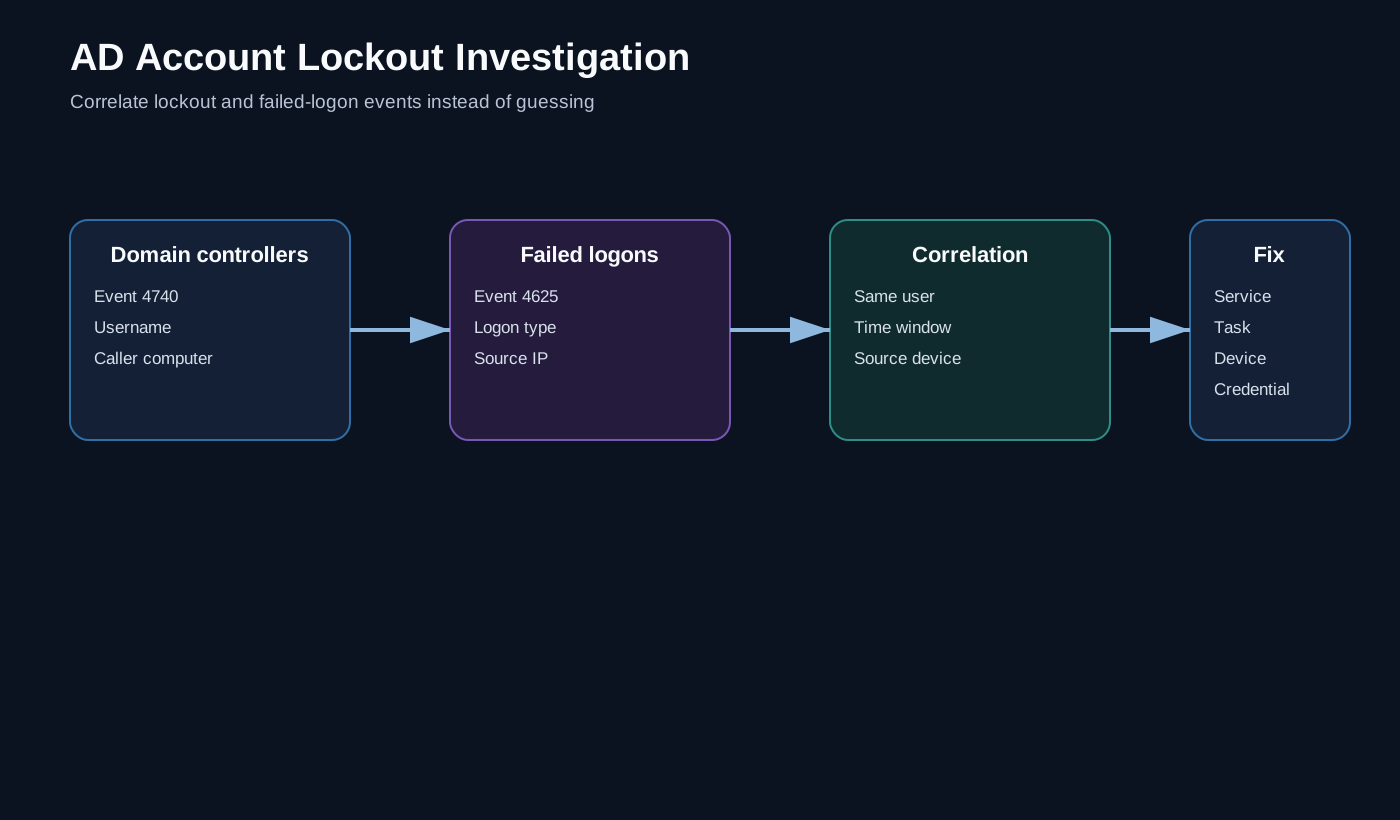
Start with Event ID 4740
Windows records an account-lockout event using security Event ID 4740.
A useful first pass is to query the security log on the domain controllers and return a small object containing:
- domain controller;
- timestamp;
- account name;
- caller computer.
A simplified pattern is:
$filter = @{
    LogName   = 'Security'
    Id        = 4740
    StartTime = (Get-Date).AddDays(-1)
}

Get-WinEvent -ComputerName $DomainController -FilterHashtable $filter
In a multi-DC environment I prefer querying each controller rather than assuming the event I need exists on the first server I happen to open in Event Viewer.
4740 tells you where to look, not always why
The caller computer is valuable, but it is not the entire investigation.
The next useful event is 4625: a failed logon.
For each event I want to extract fields such as:
Target account
Time
Logon type
Calling computer
Source IP
Now the investigation has context.
Translate logon types
The numeric logon type can tell you what class of authentication generated the failure.
Examples commonly encountered include:
2   Interactive
3   Network
4   Batch
5   Service
10  RemoteInteractive
That is much more useful than a wall of event properties.
A LogonType 5 points the investigation towards a service credential. 4 makes a scheduled/batch process more interesting. 3 suggests network authentication.
Correlate by user and time
The useful output is a timeline:
12:01:03  failed logon   workstation-17   Network
12:01:05  failed logon   workstation-17   Network
12:01:08  failed logon   workstation-17   Network
12:01:09  account locked workstation-17
At that point the conversation changes from:
“Can somebody unlock the account again?”
into:
“Which process on workstation-17 is repeatedly sending the old credential?”
That is the real troubleshooting question.
Query once, filter many times
One performance improvement is to retrieve the relevant event range once and filter in memory rather than running a remote event-log query for every user.
That is particularly useful when investigating a group of affected accounts or building a small diagnostic function.
Keep the script read-only
For troubleshooting tooling, I like the first version to only collect evidence.
Do not automatically unlock the account or change credentials from the same function that gathers the events.
Read-only diagnostics are easier to run safely, easier to delegate and easier to trust during an incident.
Practical workflow
My investigation sequence is:
- establish the time of the latest 4740 event;
- identify the caller computer;
- query 4625 events around that window;
- inspect logon type and source IP;
- identify the process, service, session or device involved;
- fix the stale credential;
- only then unlock/reset as required;
- monitor for recurrence.
The wider identity lesson
AD lockout troubleshooting is a good illustration of why identity incidents need context.
Authentication systems produce a lot of telemetry, but the value is in correlating events into a narrative. PowerShell is particularly good at turning raw event records from several machines into the small set of fields an engineer actually needs to make a decision.
Event examples use synthetic device and account names. The article does not include organisation-specific domain-controller names or user information.