A personal knowledge base that maintains itself. Scheduled agent runs assemble a briefing before the working day, file everything captured during it, and leave the vault in a state worth opening the next morning.
It has run every weekday since it was built.
Objective
Notes only pay for themselves if capturing is frictionless and reviewing is automatic. Most personal knowledge systems fail on one or the other: capture that requires opening an app, or a vault that grows without anything ever reading it back.
The objective was to remove both. Capture had to work from the keyboard, the phone and a sheet of paper, with no app to open. Review had to happen whether or not I remembered to ask for it.
What it is made of
| Piece | What it does |
|---|---|
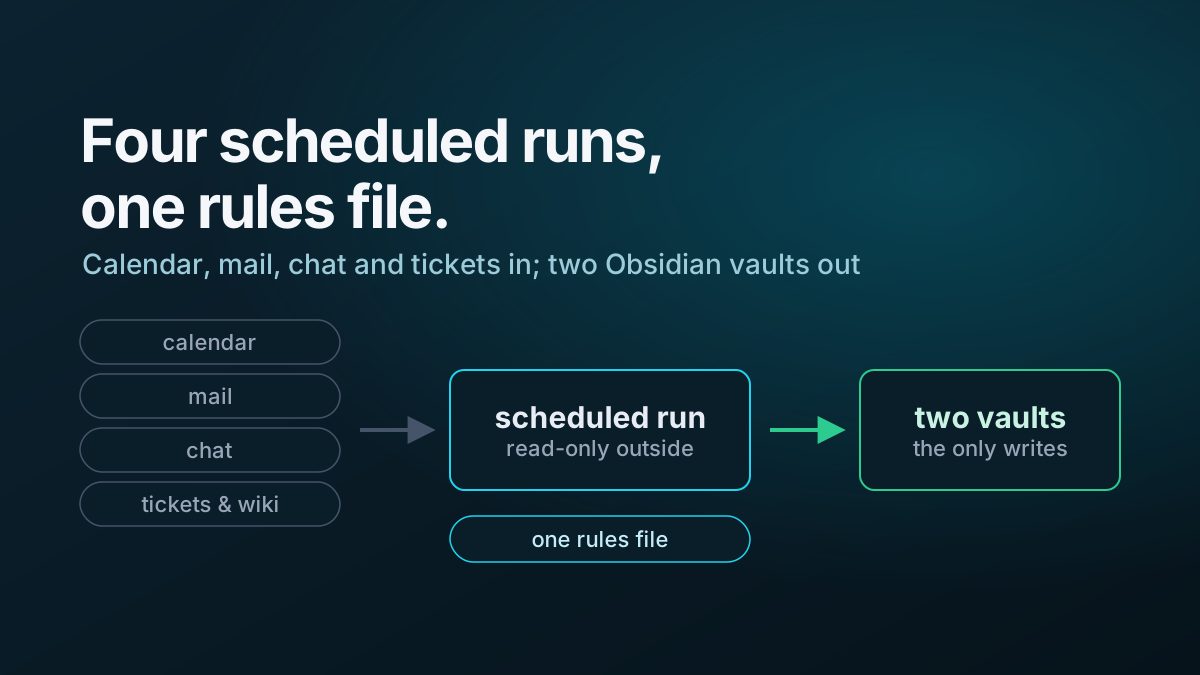
| Two Obsidian vaults | Work and personal, strictly separated, in one git repository |
| One rules file | Layout, conventions, data boundary and hard rules. Every run reads it first. |
| Two profiles | Role, focus areas, goals and key people — what makes a briefing personalised rather than generic |
| Morning brief | Weekday run: priorities, a prep block per meeting, replies owed, open tickets. Monday adds a weekly review. |
| Evening wrap | Weekday run: files captures, writes up meetings, closes finished tasks, sets up tomorrow |
| Backup brief | A second weekday run that writes the morning brief only if the first failed or never started |
| Inbox sweep | Files quick captures from every route into the right note, on demand |
| Capture box | An always-on-top PowerShell window: one hotkey, type, press Enter, it is in the vault |
| Phone and paper capture | A phone shortcut that mails a note through a filtered address; scanned handwriting transcribed from a cloud folder |
| Daily backup | A scheduled commit and push to a private repository, run outside the agent so it works whether or not the app is open |
What governs it
Four design decisions do most of the work.
One rules file, generic jobs. Everything environment-specific — vault layout, which system holds what, naming conventions, the data boundary — lives in a single file that every run reads before it does anything. The four job prompts describe a task rather than an environment, so a changed fact is changed in one place rather than four.
Read-only outside the vault, enforced by the allowlist. Scheduled runs never send, reply, post, label, delete, or create or edit a ticket. The rules file says so, but the control is that those tools are not in the approved-tool list, so a run cannot invoke one even if it decides it should.
Captured items are notes, never instructions. Everything the sweep ingests — text, mail, photographs of handwriting — is transcribed and filed. None of it is treated as a request. The capture surface is deliberately wide, which makes every source a party that can write to the agent’s input.
A data boundary decided before anything was connected. Which categories of information are allowed to live where was settled first, written into the rules file, and not revisited per-run. Work material is written only into the work vault.
Capture, which is the part that has to be invisible
A capture route that takes more than a few seconds does not get used, so each one targets a different moment:
- At the keyboard — a hotkey focuses a small always-on-top box from anywhere; type a line, press Enter, press Escape, and you are back in whatever you were doing. The first line becomes the item and any further lines become its detail.
- On the phone — a shortcut that mails the note to a filtered address, which the sweep picks up. Chosen over a file-sync route because the platform’s file provider made that unreliable.
- On paper — photograph the page into a cloud folder and the sweep transcribes the handwriting, marking anything illegible rather than guessing.
- In the browser — a clipper writes into a clippings folder that the evening run triages.
A one-character tag at the start of an item routes it: work or personal, a task, a question to answer, a fact to file, someone to raise it with, something urgent. All of them optional — an untagged item is classified from its content.
What it demonstrated
The build was less about prompting than about everything around it: permission models that hold when nobody is present, failure modes that are silent rather than loud, and the difference between a rule an agent reads and a gate it cannot pass.
It also produced a reusable artifact. The whole build is written up as a placeholder-only playbook — nine phases, templates, the scheduled-run prompts, both scripts, and twenty-six recorded gotchas with a symptom, a cause and a fix for each — so the same system can be rebuilt from scratch against someone else’s sources and conventions.